BPROT Global
2108 N ST #10529 Sacramento, CA, 95816, USA

BPROT Global
2108 N ST #10529 Sacramento, CA, 95816, USA


El Berkeley Packet Filter is a language that runs inside the system kernel. Its job is to discard irrelevant traffic before it saturates the CPU.
A filter is composed of identifiers combined with the following qualifiers:
Type: What is the ID? (host, net, port).
Dir: Where is it going?src, dst).
Proto: Which protocol does it use?tcp, udp, ip, icmp).
BPF Examples:
host 1.1.1.1 (Only HTTPS traffic).
src net 192.168.1.0/24 (Only traffic originating from that network).
port 443 (Only HTTPS traffic).
Lógica: (host A or host B) and not port 22..
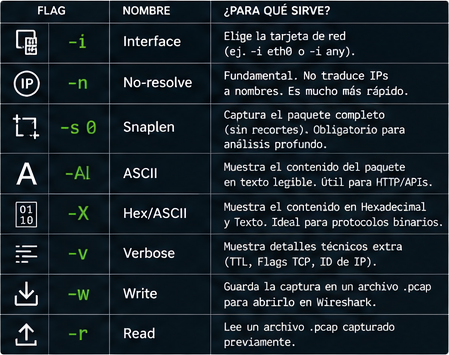
While BPF selects the packets, flags modify how tcpdump captures and displays that data. flags modifican cómo tcpdump captura y muestra esos datos.
| Flag | Name | Purpose |
-i | Interface | Selects the network interface card (e.g., -i eth0 or -i any). -i eth0 or -i any). |
-n | No-resolve | Essential. Does not resolve IPs to names. Much faster. |
-s 0 | Snaplen | Captures the entire packet (without truncation). Mandatory for deep analysis. |
-A | ASCII | Displays the packet content in readable text. Useful for HTTP/APIs. |
-X | Hex/ASCII | Reads a previously captured .pcap file. |
-v | Verbose | Displays extra technical details (TTL, TCP Flags, IP ID) |
-w | Write | Saves the capture to a .pcap file for opening in Wireshark. |
-r | Read | Reads a previously captured .pcap file. .pcap capturado previamente. |
This is where the magic happens. This is what a professional command looks like in the terminal:
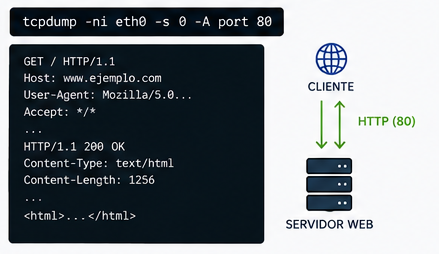
A. Real-Time Web Traffic Diagnostics
tcpdump -ni eth0 -s 0 -A port 80
Explanation: «Listen on eth0 (-i), do not resolve names(-n), capture the full packet (-s 0), display it in plain text (-A), and only if it belongs to port 80 (port 80)».
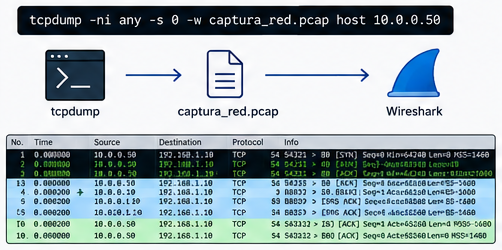
B. Silent Capture for Wireshark Analysis
tcpdump -ni any -s 0 -w captura_red.pcap host 10.0.0.50
Explanation: Listen on all interfaces, do not resolve names, capture the entire packet, and save it to a file (-w) filtering only traffic related to IP 10.0.0.50.”
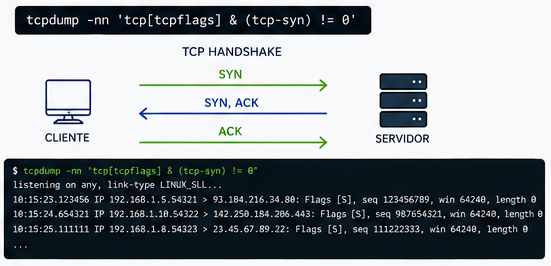
C. Network “Surgery”: View Only Connection Initiations (SYN)
tcpdump -nn 'tcp[tcpflags] & (tcp-syn) != 0'
Explanation: Uses advanced BPF to inspect the TCP flags byte and display only new connection attempts.
If the traffic load is very heavy, always use -n and -nn. Otherwise, the engine will try to query the DNS server for every IP it sees, generating additional network traffic and causing the screen to freeze or lag.