BPROT Global
2108 N ST #10529 Sacramento, CA, 95816, USA

BPROT Global
2108 N ST #10529 Sacramento, CA, 95816, USA

¡Welcome!
If you have any questions, please contact us.
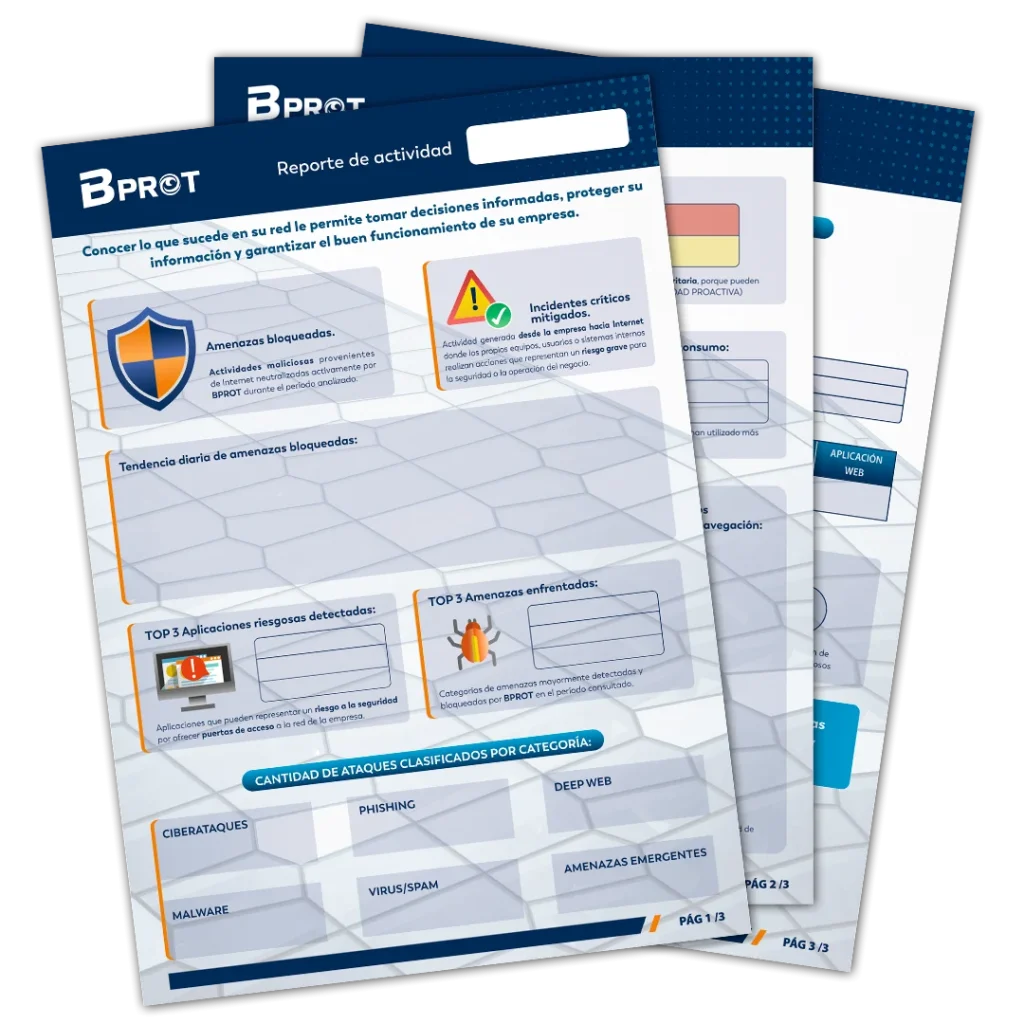
Blocked Threats:
Amenazas bloqueadas provenientes de Internet are any external, intentional or automated attempt to interact with a company’s network for harmful purposes.
They are signs that someone or something from outside is “knocking on the company’s door” in a suspicious or dangerous way.
They may include:
These events don’t always succeed in causing damage, but indicate hostile activity that must be monitoredbecause they are the first step attackers use to compromise information, affect services, or gain access to the company network.
Critical Incidents Mitigated::
Incidentes críticos que se generan desde la empresa hacia Internet son situaciones donde los propios equipos, usuarios o sistemas internos realizan acciones que representan un riesgo grave para la seguridad o la operación del negocio.
Something inside the company begins to behave dangerously outwardly, which may indicate a serious problem.
They may include:
These incidents are critical because they often reflect that there is already a breach, active malware, or unsafe behavior inside the network — which can lead to data leak, reputational damage or deeper compromises if not addressed immediately.
Daily trend of blocked threats:
A graph showing the number of threats blocked per day during the period covered in the report.
Top 3 Risky Applications Used::
Aplicaciones riesgosas son programas, servicios o sitios web que, por su funcionamiento o reputación, pueden representar una amenaza para la seguridad de la empresa.
In short: they are applications that could expose data, create vulnerabilities, or facilitate attacks even if they are not malicious by design.
They can be considered risky when:
Identifying them is important to prevent users — inadvertently — from creating security breaches or exposing critical company information.
Top 3 Threats Faced::
Amenazas son cualquier tipo de acción, técnica o contenido malicioso que busca engañar, infectar o comprometer a una empresa. Son los “peligros” reales que los atacantes usan para robar información, afectar servicios o tomar control de sistemas.
Things that can cause harm, either through deception, infection, or misuse of information.
Common examples:
Detecting and blocking them is key because they show direct attempts to compromise the network, infect machines or deceive users.
Infrastructure Health:
In a vulnerability analysis, “problems” and “warnings” represent two different risk levels, and help to understand how urgent it is to fix each finding.
Problems
They are detections that represent a real and concrete risk to the company’s security.
In simple terms: something is wrong and can be exploited by an attacker..
They may include:
They require immediate or priority action, because they may lead to unauthorized access, information theft or operational failures.
Warnings
These are situations that do not represent a direct risk, but could become a problem if not addressed.
In short: it’s not a serious flaw, but a sign that something could be improved.
They may include:
They require revisión y mejora, pero no son urgentes.
Remote Access Protection:
A remote access attempt is when someone tries to connect to a company’s computer or system from another place, through Internet or an external network.
Attempts to “enter” a company computer or server without being physically there.
They may be:
They are important to monitor because they can indicate someone is trying to take control of internal systems, access sensitive information, or move within the company network.
Top 3 Devices by Consumption:
Shows the devices connected to the network that used the most Internet during the period.
Top 3 Most Used Applications::
Shows the applications most used by users connected to the company network during the period.
Top 5 Popular Browsing Destinations:
Shows the websites most visited by users connected to the company network during the period.
Top 3 Blocked Source Countries
Shows the countries from which BPROT has intercepted the greatest number of dangerous incidents directed at the company.
BPROT Status:
Indicates the overall status of BPROT, the modules contracted by the company, remaining days of annual license, version and automatic update number.
License Capacity:
Indicates whether the number of devices connected to the network detected by BPROT falls within the licensing tier contracted by the company.
Protection Status:
BPROT's automatic updates include lists of malicious sites and actors; this indicator shows whether your company has the latest available update at the time of report generation.
Identified Malicious Sites:
These are websites created or used to carry out harmful actions..
In short: they are dangerous places on the Internet..
They may serve to:
The site is the vehicle for the attack..
BPROT updates its lists of malicious sites daily — these are reported as generating dangerous activity from top-tier repositories.
Identified Malicious Actors::
Refers to malicious IP addresses simply addresses on the Internet that have been identified as dangerous because they are associated with harmful activities.
They can belong to computers, servers or networks that carry out actions such as:
When the system detects a "malicious IP", it means that address is on blacklists or in security databases for harmful behavior. Blocking them helps avoid attacks and protect the network.
BPROT updates its lists of malicious actors daily — these are reported as generating dangerous activity from top-tier repositories.